
How to Route Twilio Calls by Business Hours (The Easy Way)
July 7, 2026 · Twilanswer Team
If you run a business on a Twilio number, business hours routing is one of the first things you need to get right. Calls during the day should reach a person. Calls at night should go somewhere sensible instead of ringing out or landing on a generic message.
Short answer: To route calls by business hours in Twilio the traditional way, use a Twilio Function or Studio Flow to check the current time against your schedule, then branch the call with TwiML depending on whether you're open. If you'd rather skip the code and time-zone math, Twilanswer adds business hours routing to your existing Twilio number from a dashboard, with any action you choose for after-hours calls, including voicemail.
Twilio can absolutely handle this. You can check the time, branch the call, and send it wherever it needs to go. But the standard setup means writing and hosting logic just to answer one question: are we open right now?
This guide walks through the traditional Twilio setup step by step, then covers the easier no-code path with Twilanswer.
Why Business Hours Routing Gets Complicated
At a basic level, business hours routing sounds simple:
- Caller reaches your Twilio number
- Twilio checks whether you're currently open
- If open, the call goes to your team
- If closed, the call goes somewhere else
The complication is that Twilio doesn't have a built-in concept of "business hours." It gives you the building blocks to check the time and branch a call, but you have to define the schedule, handle time zones and daylight saving, and decide what "somewhere else" actually means.
For developers, that flexibility is useful. For small teams that just want calls to route correctly without redeploying code every time the hours change, it adds up to more plumbing than it should.
The Hard Way: Route Calls by Business Hours in Twilio
Here is the standard approach, broken into steps:
- Buy or configure a Twilio phone number in the Twilio Console.
- Write a Twilio Function (or build a Studio Flow) that runs when a call comes in.
- Define your business hours somewhere the Function can read them, such as a hardcoded schedule or an external config.
- Check the current time against that schedule, accounting for your business's time zone.
- Return different TwiML depending on the result, one path for open, one for closed.
A simple version of the time-check logic in a Twilio Function might look like this:
exports.handler = function (context, event, callback) {
  const twiml = new Twilio.twiml.VoiceResponse();

  // Business hours: Mon-Fri, 9am-5pm, America/New_York
  const now = new Date().toLocaleString('en-US', { timeZone: 'America/New_York' });
  const current = new Date(now);
  const day = current.getDay();
  const hour = current.getHours();

  const isOpen = day >= 1 && day <= 5 && hour >= 9 && hour < 17;

  if (isOpen) {
    twiml.dial('+15551234567');
  } else {
    twiml.say('We are currently closed. Please leave a message after the tone.');
    twiml.record({ maxLength: 120, action: '/after-hours-complete' });
  }

  callback(null, twiml);
};
This tells Twilio to check the day and hour, then either connect the caller or send them to a recording. It's enough to get basic business hours routing working, but it's not enough to run it reliably for a real business.
What You Still Have to Build
Once the basic time check works, most teams end up building more around it. Depending on your setup, that can include:
- A schedule format that supports different hours per day
- Time zone logic that stays correct across daylight saving changes
- A way for non-engineers to update hours without touching code
- Different after-hours actions for different scenarios, not just one fallback
- Testing that the schedule actually behaves correctly at the boundaries, like 4:59pm versus 5:00pm
None of this is difficult in isolation. But it's another operational system your team has to own, and it tends to get revisited every time your hours change, which for most businesses is more often than the code gets touched otherwise.
Common Business Hours Routing Mistakes
Whether you build this yourself or use a no-code layer, these are worth avoiding:
- Hardcoding a time zone that doesn't match where the business actually operates
- One rigid after-hours action, like always hanging up, when different situations call for different handling
- Hours that only an engineer can update
- No fallback if the time-check logic itself fails
The goal isn't just a rule that checks the clock. It's a routing setup your team can actually maintain as hours change.
The Easy Way: Business Hours Routing with Twilanswer
Twilanswer is built for teams that want Twilio-powered call routing without writing and hosting their own time-check logic.
Instead of a Function or Studio Flow, you configure business hours as part of a call route in a dashboard. You set your hours once, per day of the week, and Twilanswer handles the time zone and daylight saving math for you.
A typical Twilanswer business hours setup looks like this:
- Connect your Twilio number
- Set your business hours for each day of the week
- Choose the call action for business hours, such as ringing a team member or a queue
- Choose the call action for after hours
- Save the route and test it
The part worth calling out: for after-hours calls, you're not limited to one fixed behavior. You can send them to any call action, not just voicemail. That might mean voicemail with transcription so nothing gets lost overnight, but it could just as easily be an IVR menu, a different number, or a message pointing callers to another way to reach you. See how to configure call routes for the full set of options.
The result is still powered by your own Twilio number, but the operational pieces, the schedule, the time zone handling, the after-hours behavior, become settings instead of code.
Example: A Practical Business Hours Flow
Here's a simple setup for a small service business:
- Monday through Friday, 9am to 5pm, calls ring the main team line
- Outside those hours, calls route to voicemail with transcription so the team can follow up in the morning
- If the team's hours change for a season, they update the schedule in the dashboard without touching any code
- Missed-call details are logged for follow-up
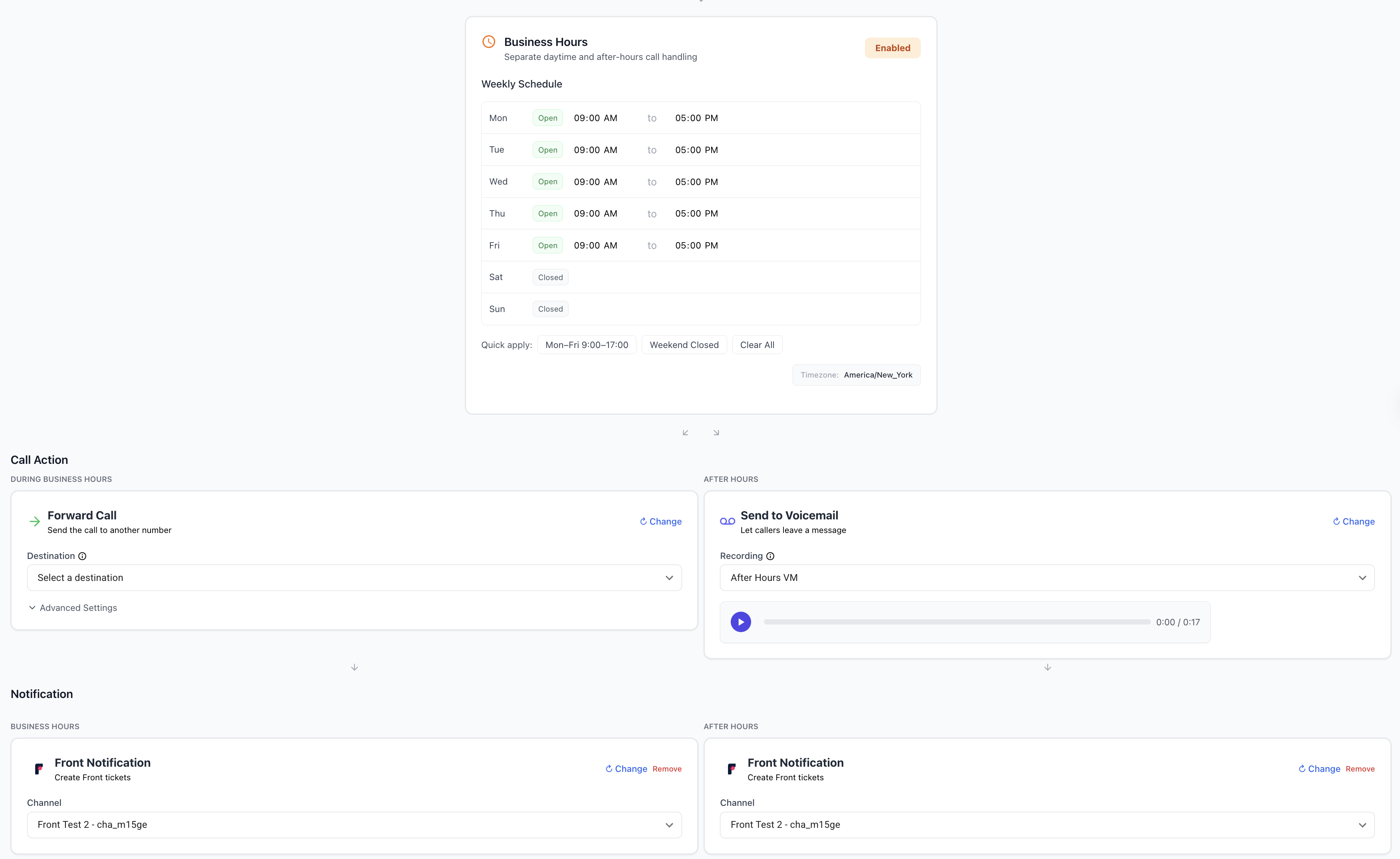
With raw Twilio, each of those branches needs to live in a Function, a Studio Flow, or some combination of both. With Twilanswer, they're call route settings that can be changed in minutes.
Twilio vs. Twilanswer for Business Hours Routing
| Feature | Raw Twilio | Twilanswer |
|---|---|---|
| Setup time | Hours (Function or Studio Flow + testing) | Minutes in a dashboard |
| Code and hosting | Required | Not required |
| Time zone and DST handling | You build it | Handled for you |
| After-hours options | Whatever you code | Any call action, including voicemail, IVR, or another number |
| Who can update hours | Engineers | Anyone on your team |
| Best for | Custom, deeply integrated systems | Teams that want reliable routing live quickly |
Raw Twilio is a good fit when you need tight control and have engineering time to maintain it. If business hours routing is deeply tied into other internal systems, a custom build may be worth it.
Twilanswer is a better fit when you want business hours routing that works correctly and can be updated by anyone on the team, without redeploying code every time your hours change.
Choose raw Twilio if:
- You already have a backend for voice workflows
- You need highly custom scheduling logic
- You want to build a proprietary phone system
- You have engineers available for ongoing changes
Choose Twilanswer if:
- You want business hours routing live quickly
- You need non-technical people to update hours
- You want flexible after-hours actions, not just one hardcoded fallback
- You prefer to keep engineering focused on your core product
Frequently Asked Questions
Does Twilio support business hours routing out of the box?
Not as a built-in feature. Twilio provides the building blocks, phone numbers, TwiML, Functions, and Studio, and you assemble the time check and call branching yourself using a Function or Studio Flow. Twilanswer is a no-code way to set up business hours routing on your existing Twilio number, letting you define hours and after-hours actions from a dashboard instead of writing that logic.
How do I route Twilio calls based on time of day?
Use a Twilio Function or Studio Flow to check the current time against your defined business hours, then return different TwiML depending on whether you're open or closed. You'll need to handle the schedule, the time zone, and the branching logic yourself. Alternatively, Twilanswer sets up time-of-day call routing on your Twilio number without code, with the time zone and schedule handled in a dashboard.
Do I need a server to route calls by business hours in Twilio?
For the standard Twilio approach, yes, or at minimum a Twilio Function to run the time check and return TwiML. That means hosting and maintaining code just to answer whether you're currently open. Twilanswer removes that requirement, letting you configure business hours routing on your Twilio number from a dashboard with no server to run.
Can after-hours calls go somewhere other than voicemail?
Yes. After-hours calls can route to any destination you choose, such as an IVR menu, a different number, or a message with alternate contact information, not just a voicemail recording. With raw Twilio, each of those options has to be built into your TwiML or Studio Flow. Twilanswer lets you pick any call action for after-hours calls directly in a call route, including voicemail as one option among several.
Final Thoughts
Twilio gives you the building blocks for business hours routing, but the standard setup means writing and maintaining your own time-check logic, time zone handling, and after-hours branching.
For teams with specific engineering needs, that flexibility is valuable. For teams that just need calls to route correctly by time of day, Twilanswer provides a faster path, with the flexibility to send after-hours calls wherever makes sense, not just to voicemail.
If you want to set up Twilio business hours routing without building and maintaining custom logic, try Twilanswer free for 14 days.